

It allowed me to unleash my creativity, connect with awesome like-minded people, and make money in the process.
In this post, I'll show you exactly how to build your blog from the ground up without spending a ton of money (my readers also get a discount through this link).
So... can you really make money blogging?
Yep. I've been making over $10,000 every month for a few months now. Check out my latest income report here.
If you've ever wondered whether you should have a blog of your own, please do it. I know there's something you're passionate about, whether it's makeup, fashion, fitness, or whatever else you're in love with. Follow your creative dreams. You never know where they could take you!
Here's what I'm going to cover:

The Basics
Getting your own domain and hosting is the way to go. This means you'll have your own site, like www.crueltyfreekitty.com.
I also strongly recommend WordPress to build your blog. It's easy and free. WordPress trumps Blogger/Blogspot, and it's more affordable than Squarespace. If you don't know how to install WordPress, I'll show you exactly how to set it up in this post.
If you already have a blog hosted on Blogspot or Tumblr, making the switch is totally worth it. You get to keep all your existing posts and transfer them.
Myths And Facts
There are a few myths about having your own domain and hosting, so let me set them straight right now.
Myth #1: Running your own blog is expensive.
You can have your own, self-hosted blog for under 4$ a month. Don't go with anything more expensive than that, because it's unnecessary. BlueHost offers the best prices, and you get a free domain.
Myth #2: It's hard and confusing to set up!
I'm not particularly computer-savvy, and I still managed to do it! I'll show you how simple it is and guide you through the whole process.

Myth #3: It's impossible to make any money with a small blog.
Odds are you're going to be making more than what you're paying to run your blog. One of the advantages of having your own, self-hosted blog is having the freedom to monetize it.
Myth #4: It's really hard to make a blog look good with WordPress.
There's a ton of pretty themes you can choose from, including free ones. Installing a theme is quick and easy. You don't even need to know any kind of coding or have experience with web design. Using WordPress will make your blog look better since it's more customizable than Blogspot.
Boom! Myths debunked. No excuses. Creating your own blog is simple, cheap, and awesome.
What Should I Blog About?
It's important to know specifically what your focus will be. A focused blog makes blogging easier. Here are some examples.
- Reviews. If you're a product junkie, you can write helpful reviews.
- >Makeup artistry. If you've got skills, you can show off your looks.
- Swatches. Good swatches can be hard to find. Everybody loves dupes.
- Budget beauty. You could focus on drugstore and affordable brands.
- Nails. If you love nail polish and have a talent for nail art, you could make it your main focus.
- Jane-of-all-trades.> If you love ALL things beauty, you can figure out your focus as you blog.

What Equipment Do I Need?
You don't absolutely need any tools to start blogging, but this is what I recommend for a beginner:
- A basic camera. You can use any digital camera, a DSLR, or your iPhone. Some bloggers even use their phone's camera.
- Photoshop or a free alternative. Editing your photos will make them look professional no matter what camera you use.
- Natural light. You don't need photography equipment when starting out. Natural light is the best light to shoot in. You can always buy studio lighting along the way.
The Fun Part: Your Domain Name
Once you figure out the topic of your future blog, you're ready for one of my favorite parts: picking a domain name!
Start thinking of a potential domain name by brainstorming and expanding on your subject. Your domain name should be memorable and brandable above all.
Enter your ideas below to check if they're available.
A good tip is using your first name as part of your domain. Think of blogs like "karlascloset.com", "viviannadoesmakeup.com" or "deliciouslyella.com". Try it with your blog!

1. Sign Up With BlueHost
The first thing you need to do is find a webhost. The most popular one is BlueHost, which I recommend going with. They offer cheap hosting and a free domain name.
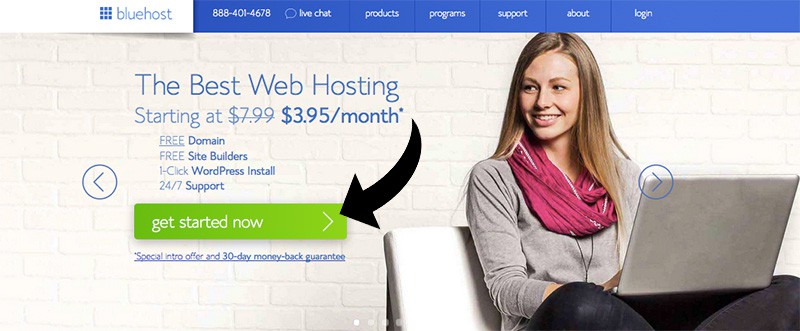
Go to BlueHost and click "Get Started Now".
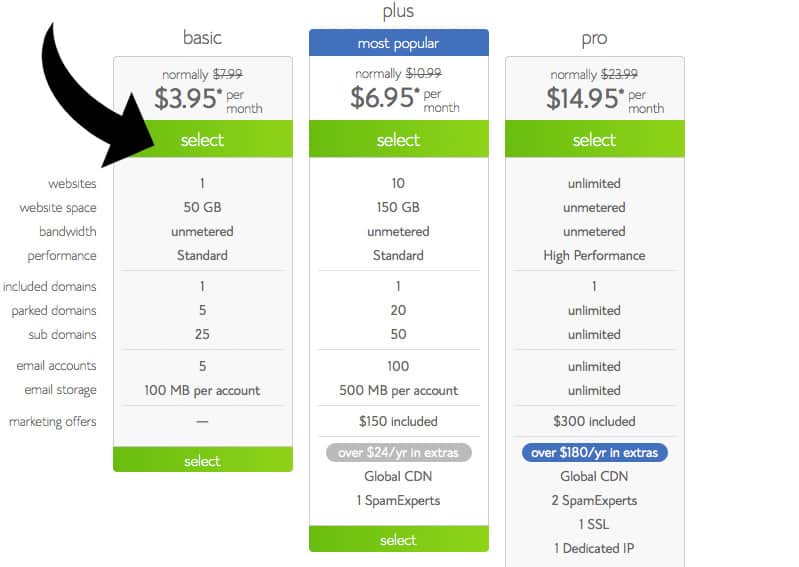
Select the basic plan.
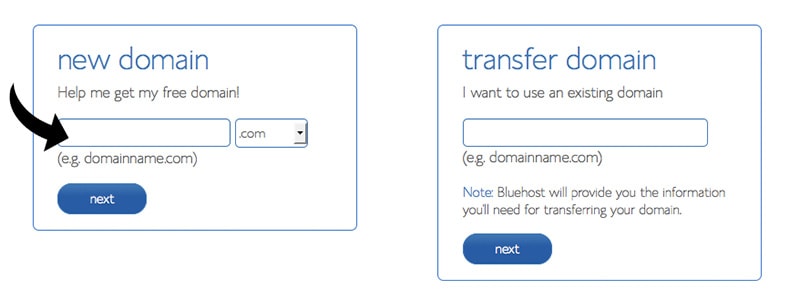
You need to find a good domain name that isn't taken. I recommend going with a .com, but whatever floats your boat. Click next.
Now create your account by filling out your contact info.
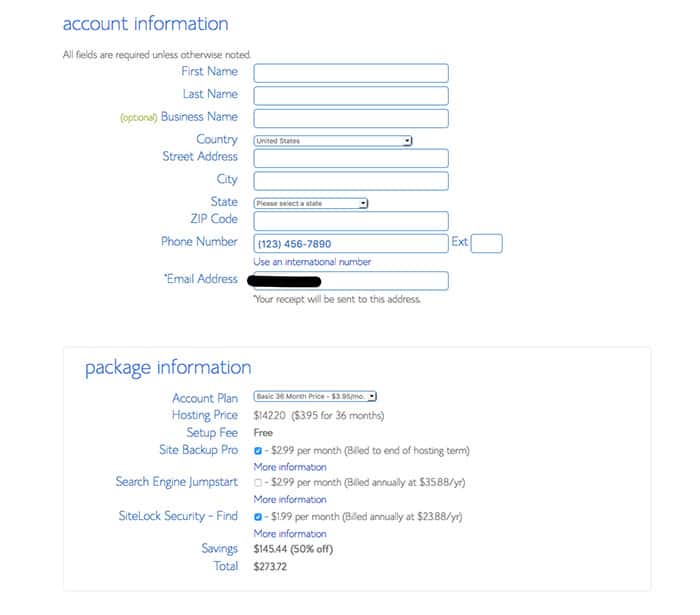
Pick your plan, and pick whatever additional features you want. The only extra I recommend is getting domain privacy if you want your information to be hidden. Click "Next".
Next, choose your package. Bluehost offers plans for 12 months, 24 months, and 36 months. I recommend going with the 36-month plan to get the best price, but keep in mind that you'll pay for the full package up front. For example, if you select the 36-month package at $2.95/month, your total will be $106.20.
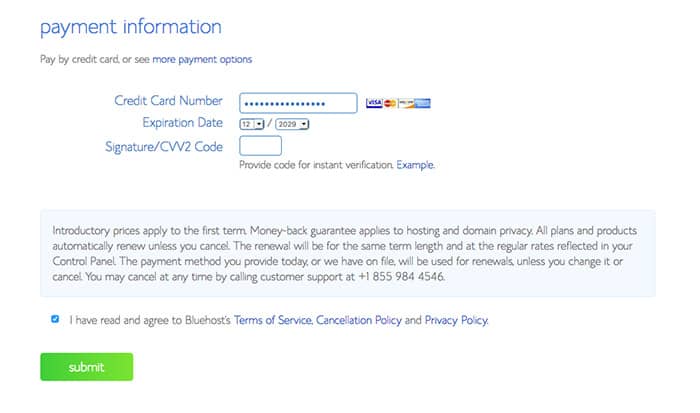
Enter your payment information.
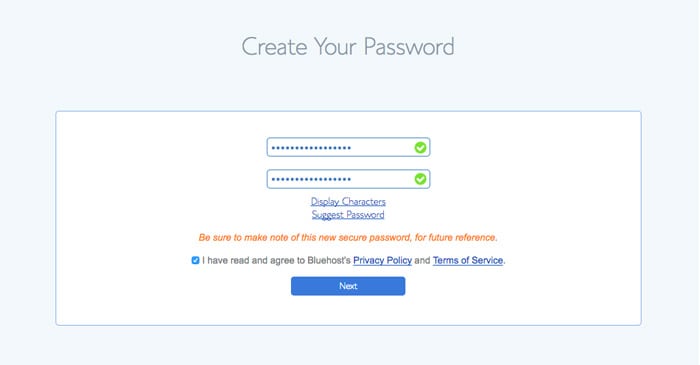
The final step is choosing a password for your account. Make this password extra hard to crack by using uppercase letters, lowercase letters, numbers, and symbols.
Once your account is created, log into your dashboard at Bluehost.com.
2. Install WordPress
Next, you want to install WordPress. This step is super quick and easy!
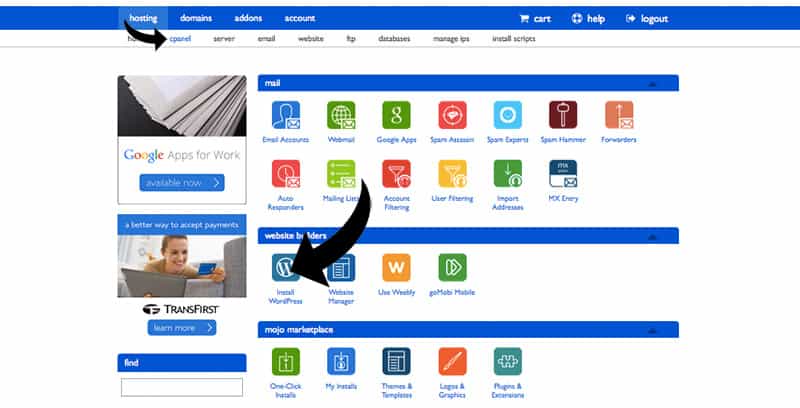
In your BlueHost account, click on cPanel. Click "Install Wordpress".
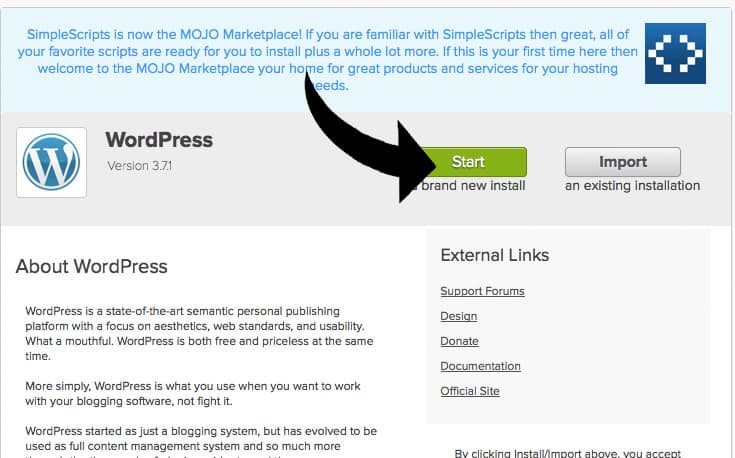
Click "Start".
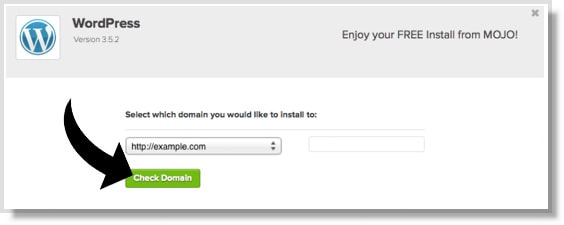
Select your domain and click "check domain".
Enter your blog info and click "Install Now".
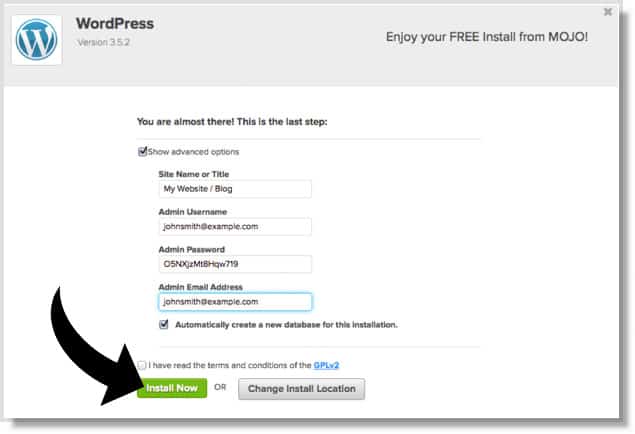
Once it's done installing, you'll receive your WordPress login information by e-mail.
Go to www.yoursite.com/wp-admin/ and sign in!
Last Step: Make It Pretty
Install a theme to make your blog look nice.
On the left side, select "Appearance" and click "Themes". Click "Add new". You can now browse thousands of themes. Try selecting features such as "right sidebar" or colors. If you're stumped, try searching for "themify" or "fashionista". There's a lot of free themes. Have fun with it!
You're Ready For Your First Post
In the left menu, select "Posts" and click "Add new". Write your first post and click "publish"!
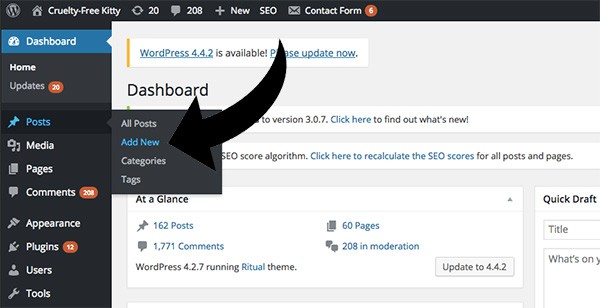
That's it!
If you followed this step-by-step guide and signed up with BlueHost, you just realized how easy it really is to start your own blog.
I hope this tutorial has been helpful. Good luck on your journey!
Which Brands Are Cruelty-Free?
Download our list of 1,000+ verified cruelty-free brands straight to your device. Bring it with you everywhere you go, and never worry about supporting animal testing again. Click here to download
Share this post
The more people go cruelty-free, the sooner we can end animal testing. Thank you for sharing.


Hi, thanks so much for the useful tips. I’m wondering if you do product reviews & you don’t have any images of the actual product itself for you to take photos of, can you use images of the product from the company’s website without their permission or do you have to email & ask them every time? I’m just wondering how much of an issue copyright is here? If you have any advice it would be really helpful! Thanks x
Its really very nice to read this blog. It is very informative and the content used is very interesting. Would like to read few more blogs like this. Good Luck.
Hi! I found your blogs after looking up how to start makeup blogs. I’ve had a blog before but got busy and I had to take it down. But I’m starting a new chapter in my life and my coworker suggested making a makeup blog because I love makeup. I’ve been reading your blogs on starting blogs and monetizing them.
I was just wondering how often you posted at the beginning and did you start posting less or more as time went by? I’m not very outgoing on social media, but I wouldn’t mind changing that.
Thank you so much, and I hope you keep making blogs on these things! I love your attitude!
Hi Hannah, thank you! I was posting more when I started, and started posting less as time went on. I write posts about blogging on my other site, so those might be useful if you’re a beginner. For example here’s my post about monetizing a blog. 🙂
What does BlueHost do? As in, why do I need to sign up via that? Can’t I just make a normal WordPress account? (I’m really new to this!)
Love your blog! I just started mine and it’s quite the journey. I’m still figuring the in’s and out’s with widgets and such. But, I’m having a lot of fun with it. (hoping to make a little extra money in the future too!) 🙂
Hi! This blog post was very helpful and inspiring as it took the “scary” out of starting a blog. Is there another post about monetizing or how to get affiliate links? need to know how exactly to get money to the blog.
Hi Melanie! Check out my posts on monetizing here:
– Blogger’s Guide to Affiliate Links
– 35 Ways To Monetize a Blog
🙂
Hi Suzi, thank you so much for this post. it is super helpful. i’m thinking of starting my blog in about two months. so far I’ve just been doing research and getting to understand how everything works. i just have one question regarding social medias for the blog. when creating a social media for the blog, how do you get followers that will add traffic to the blog? also should i create the social media accounts first and find a way to get followers and then create my blog so i can already have my social media followers to go in it? or should i create the blog first and then the social media accounts? sorry for the long comment but it’d be really helpful if you could answer. Thank you
I would like to start a beauty skin care blog that has links, reviews, Hauls etc I used to work for Sephora and am a medical esthetician and I am licensed in cosmetic laser. How do people get free products by talking, promoting or reviewing their beauty products? Also I was going to use WordPress. Does it matter if you get the one that has ads on it or not ? And if I have WordPress why do I have to do that other thing the blue …. thing ? If WordPress already gives you a domain/site name ?
Hi! What theme do you use? I’ve done everything and now I’m just trying to find a theme and figure out how to customize things : I love the way yours is set up and tried to look up RoseVibe on the themes but couldn’t find it 🙁 how did you get yours onto wordpress?
Hi Shelly! I made this theme from scratch, so I’m glad that you like it! I’m sorry I don’t know of anything similar I can suggest. :/
From where can i find disclaimers and policies template.
Is there any standard format available.
hi, I opened a blog with wordpress but I don’t know how to learn from it..I actually opened it for free..can you please tell me what steps to take
thank you SO MUCH for this advice, it is inspiring me to write my own blog, which I have been thinking about for a while. I love how helpful you are and willing to lift others up and help them! This is what it is all about 🙂
Do you know any website that I can copy and paste pictures of makeup into my blog.please email me on my private email adress.
Thanks so much for this! I just launched my own blog last week via WordPress. Good to know I can use the same site through BlueHost. I’ve been blogging forothers for years, and have always found WordPress to be the best and easiest to use.
Thank you so much this really helped but I just wanted to ask you something. Does the BlueHost discount that you’re doing last for a certain amount of time or forever? Thanks.
Great article it seriously inspired me to take the plunge and create a beauty/fashion blog. Since those are my two loves… do you have any tips for running an instagram based blog?
Hi Suzi! Am i free to change my domain name anytime i want? If i change my mind or thought of something better? 🙂
Great tips, I will have to look into it! Check out my tips at:
https://effiore.com/5-makeup-products-you-didnt-know-you-needed/
Thank you, I am starting out and a post like this is really useful.
Thanks, just set up my own cruelty free beauty blog and this is really helpful xx
Very nice Article and good for startup bloggers also your site is beautiful and best coding theme.
I already created one in
Blogger, should I switch? It’s pretty good looking, but not perfect http://www.lipsdotloveit.com
I already started one on blogger. Should I change to WordPress??
Hello, sorry in advance if this has already been asked. I just started a blog on WordPress and would like to also get a host site like Bluehost. My question is, since I am doing it backwards, do I need to update my wordpress to personal for $3/month to get my domain without the .wordpress.com? This is all BRAND new to me and I just want to make sure I’m making the right choices and not wasting any money on the way.
Thank you
Thank you so much for such an informative way to start a blog. I want to start and am currently researching. This was the most helpful! My question is, when did you decide to just go for it? I’m brainstorming right now and getting my creative juices flowing! But I want to take the plunge soon!
wow, what a comprehensive guide. Well written and very savvy. You bring up some great points for newbie bloggers, I came from a design background to it was easy to set it up, but you have done a brilliant job of debunking the myths.
Nice tips! It is just awesome. I will add in my list & i am also suggest to my friends to read your post.
This article was super informative!! For a while I’ve wanted to start blogging of some sort, like actually blogging and not just keeping up my tumblr lol. Being a male who is very into makeup and beauty I want my blog to focus mainly on that. However, I want the general theme to be things I love and am interested in so I want to blog about music as well (I keep up with new music and artists heavily) and some lifestyle posts as well. I don’t know if that’s too wide of a range of things but that is what really represents me and I don’t want to have to make separate blogs to write about all of it.
My question for you Suzi is how do you like start your blog off after getting it all set up. Do you just launch into your first content post or like is your first entry a biography piece of sorts? Like one that will introduce yourself, your interests, and what you will be blogging about. The first post is always the hardest for me haha.
Thank you for putting this entire article together! It was extremely helpful and made me really decide to pursue this!
Hey Ryan, thanks! Honestly it takes a while in the beginning to figure out exactly what you want your blog to be. During my first year, I was posting more personal content but I eventually found that I prefer focusing on providing information. Your first posts aren’t that important and you might even end up deleting them, so go with your gut and see where it takes you!
What a great post, Suzi! I think it really helped us out because while we’re a fashion platform, we’re trying to divert more attention to style guides, reviews and articles about fashion/beauty in general. Will definitely let my bosses know about your article 😉
In Malaysia, we do have bloggers, but most of them switched lanes to social media now. For us, we have like a mini blog for our users. Here’s our style guides: https://shopprapp.com/style-guides
Hope the article inspires you, Suzi, as yours did to me.
Love,
June from Shoppr
Wow! I just stumbled upon your blog and I love it so much! The layout is gorgeous. I was told I should use a certain theme but yours looks so much prettier. Any particular wordpress theme recommendations? I would love to hear your favorites 🙂
Thank you! I don’t have any recommendations for free themes right now (I’m sorry!) but I’ll look into it.