

It allowed me to unleash my creativity, connect with awesome like-minded people, and make money in the process.
In this post, I'll show you exactly how to build your blog from the ground up without spending a ton of money (my readers also get a discount through this link).
So... can you really make money blogging?
Yep. I've been making over $10,000 every month for a few months now. Check out my latest income report here.
If you've ever wondered whether you should have a blog of your own, please do it. I know there's something you're passionate about, whether it's makeup, fashion, fitness, or whatever else you're in love with. Follow your creative dreams. You never know where they could take you!
Here's what I'm going to cover:

The Basics
Getting your own domain and hosting is the way to go. This means you'll have your own site, like www.crueltyfreekitty.com.
I also strongly recommend WordPress to build your blog. It's easy and free. WordPress trumps Blogger/Blogspot, and it's more affordable than Squarespace. If you don't know how to install WordPress, I'll show you exactly how to set it up in this post.
If you already have a blog hosted on Blogspot or Tumblr, making the switch is totally worth it. You get to keep all your existing posts and transfer them.
Myths And Facts
There are a few myths about having your own domain and hosting, so let me set them straight right now.
Myth #1: Running your own blog is expensive.
You can have your own, self-hosted blog for under 4$ a month. Don't go with anything more expensive than that, because it's unnecessary. BlueHost offers the best prices, and you get a free domain.
Myth #2: It's hard and confusing to set up!
I'm not particularly computer-savvy, and I still managed to do it! I'll show you how simple it is and guide you through the whole process.

Myth #3: It's impossible to make any money with a small blog.
Odds are you're going to be making more than what you're paying to run your blog. One of the advantages of having your own, self-hosted blog is having the freedom to monetize it.
Myth #4: It's really hard to make a blog look good with WordPress.
There's a ton of pretty themes you can choose from, including free ones. Installing a theme is quick and easy. You don't even need to know any kind of coding or have experience with web design. Using WordPress will make your blog look better since it's more customizable than Blogspot.
Boom! Myths debunked. No excuses. Creating your own blog is simple, cheap, and awesome.
What Should I Blog About?
It's important to know specifically what your focus will be. A focused blog makes blogging easier. Here are some examples.
- Reviews. If you're a product junkie, you can write helpful reviews.
- >Makeup artistry. If you've got skills, you can show off your looks.
- Swatches. Good swatches can be hard to find. Everybody loves dupes.
- Budget beauty. You could focus on drugstore and affordable brands.
- Nails. If you love nail polish and have a talent for nail art, you could make it your main focus.
- Jane-of-all-trades.> If you love ALL things beauty, you can figure out your focus as you blog.

What Equipment Do I Need?
You don't absolutely need any tools to start blogging, but this is what I recommend for a beginner:
- A basic camera. You can use any digital camera, a DSLR, or your iPhone. Some bloggers even use their phone's camera.
- Photoshop or a free alternative. Editing your photos will make them look professional no matter what camera you use.
- Natural light. You don't need photography equipment when starting out. Natural light is the best light to shoot in. You can always buy studio lighting along the way.
The Fun Part: Your Domain Name
Once you figure out the topic of your future blog, you're ready for one of my favorite parts: picking a domain name!
Start thinking of a potential domain name by brainstorming and expanding on your subject. Your domain name should be memorable and brandable above all.
Enter your ideas below to check if they're available.
A good tip is using your first name as part of your domain. Think of blogs like "karlascloset.com", "viviannadoesmakeup.com" or "deliciouslyella.com". Try it with your blog!

1. Sign Up With BlueHost
The first thing you need to do is find a webhost. The most popular one is BlueHost, which I recommend going with. They offer cheap hosting and a free domain name.
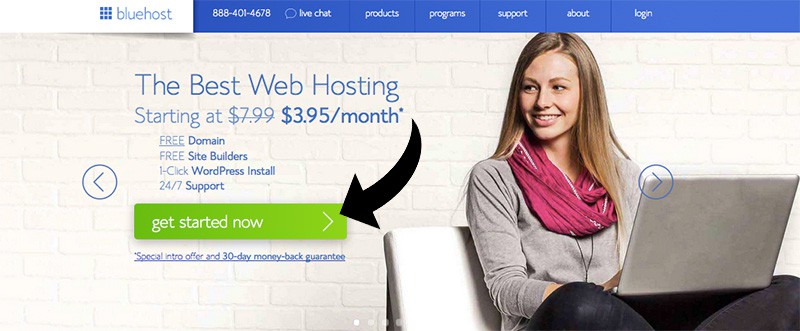
Go to BlueHost and click "Get Started Now".
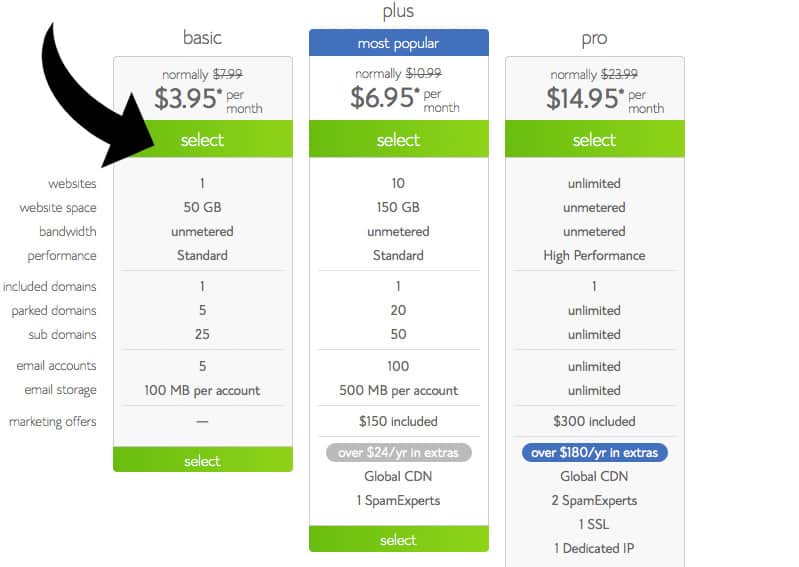
Select the basic plan.
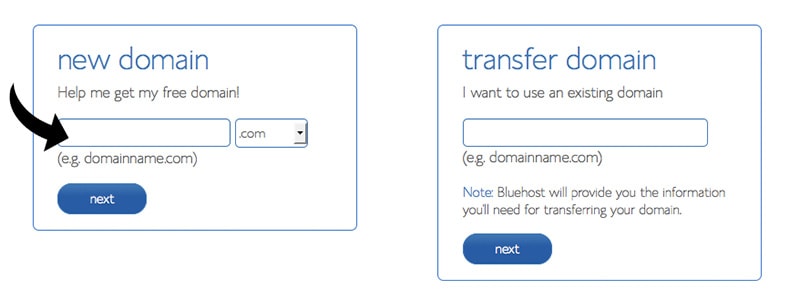
You need to find a good domain name that isn't taken. I recommend going with a .com, but whatever floats your boat. Click next.
Now create your account by filling out your contact info.
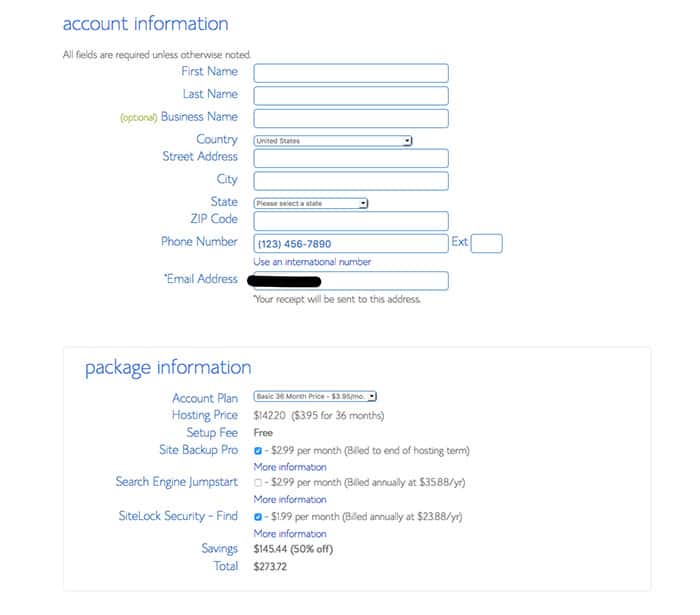
Pick your plan, and pick whatever additional features you want. The only extra I recommend is getting domain privacy if you want your information to be hidden. Click "Next".
Next, choose your package. Bluehost offers plans for 12 months, 24 months, and 36 months. I recommend going with the 36-month plan to get the best price, but keep in mind that you'll pay for the full package up front. For example, if you select the 36-month package at $2.95/month, your total will be $106.20.
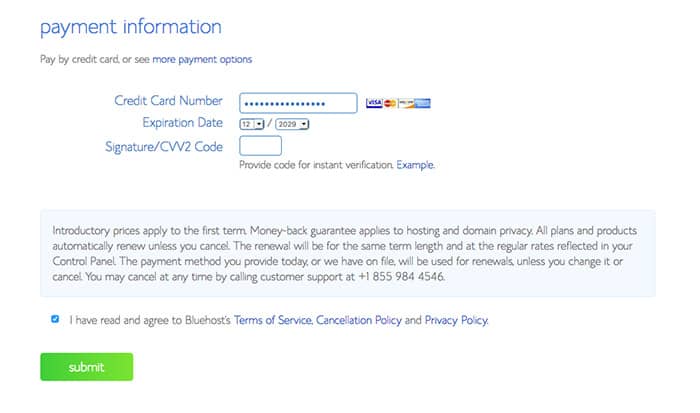
Enter your payment information.
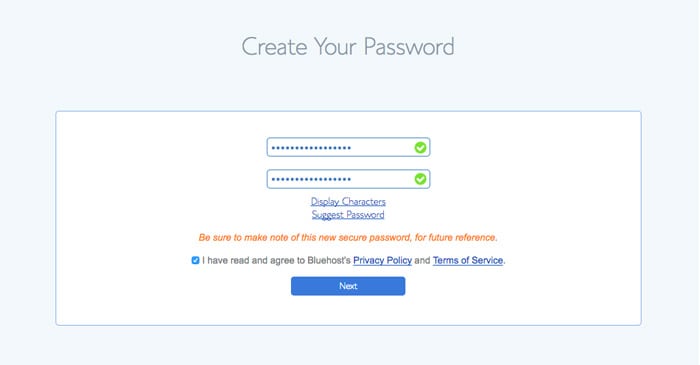
The final step is choosing a password for your account. Make this password extra hard to crack by using uppercase letters, lowercase letters, numbers, and symbols.
Once your account is created, log into your dashboard at Bluehost.com.
2. Install WordPress
Next, you want to install WordPress. This step is super quick and easy!
In your BlueHost account, click on cPanel. Click "Install Wordpress".
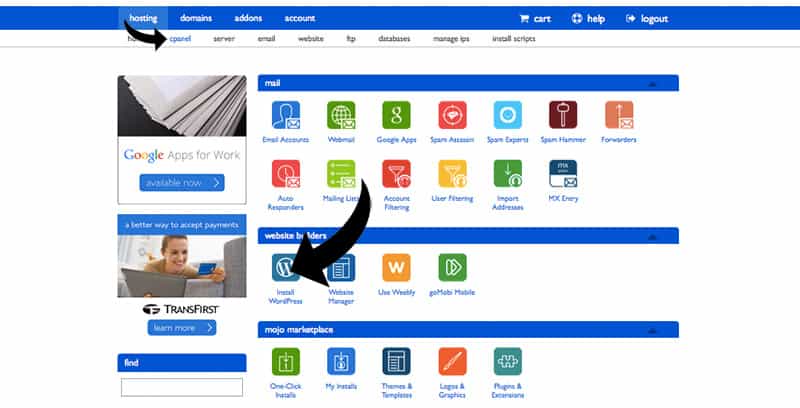
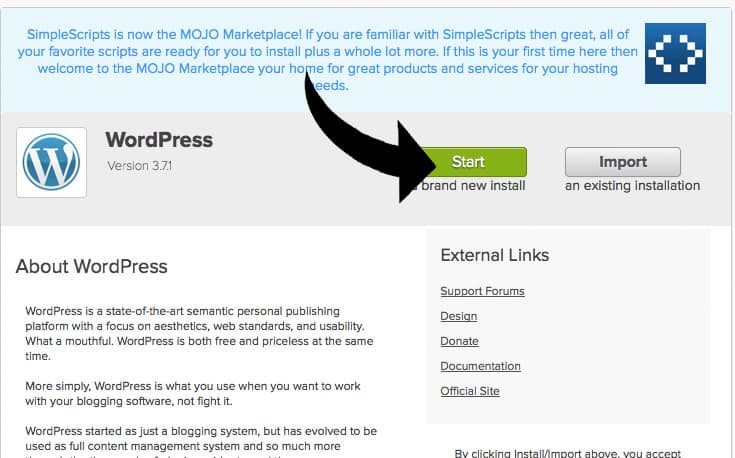
Click "Start".
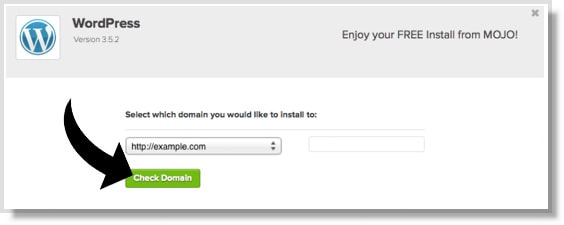
Select your domain and click "check domain".
Enter your blog info and click "Install Now".
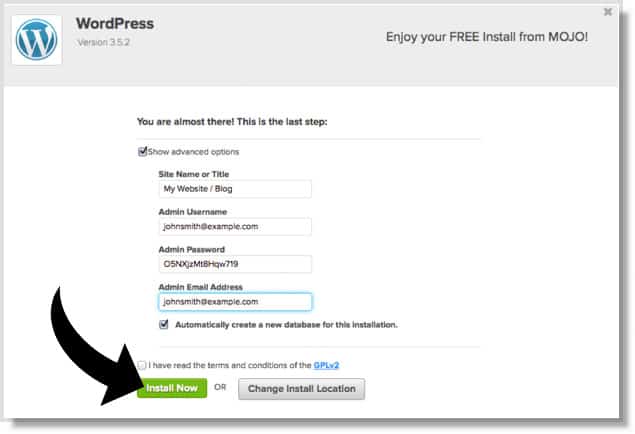
Once it's done installing, you'll receive your WordPress login information by e-mail.
Go to www.yoursite.com/wp-admin/ and sign in!
Last Step: Make It Pretty
Install a theme to make your blog look nice.
On the left side, select "Appearance" and click "Themes". Click "Add new". You can now browse thousands of themes. Try selecting features such as "right sidebar" or colors. If you're stumped, try searching for "themify" or "fashionista". There's a lot of free themes. Have fun with it!
You're Ready For Your First Post
In the left menu, select "Posts" and click "Add new". Write your first post and click "publish"!
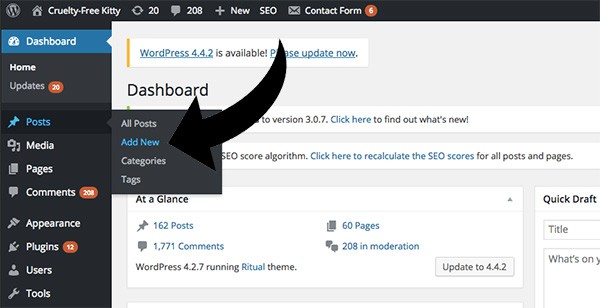
That's it!
If you followed this step-by-step guide and signed up with BlueHost, you just realized how easy it really is to start your own blog.
I hope this tutorial has been helpful. Good luck on your journey!
Which Brands Are Cruelty-Free?
Download our list of 1,000+ verified cruelty-free brands straight to your device. Bring it with you everywhere you go, and never worry about supporting animal testing again. Click here to download
Share this post
The more people go cruelty-free, the sooner we can end animal testing. Thank you for sharing.


Thank you Suzy for such simple yet in-depth guide. I have been following your work for quite sometime now and I really appreciate how much efforts you put into creating this list of cruelty-free brands. Kudos!
I am also willing to start a beauty blog like this your ideas are really helped me !
thanks a lot .
Thank you for your kind comment, good luck!
Thanks for sharing your blog with all of us. An informative blog list you provide.
Thank you for the kind comment, Kelly!
thank you for sharing such an informative blog post. It’s really helpful for many of us. you just made an effort to make us feel blogging is damn easy as a beginner.Will start my blog on WordPress.com super soon.
I just started to create my own beauty blog at http://www.missmakeup.com.au
I would love for you to check it out and give me some feedback
Thanks for sharing with us, as newbie this is very worth full and i will try to start my beauty and health related blog.
well done, i should start
Right now I have a very neglected website that I started a few years ago. Lately I’ve been thinking about getting back to blogging at my site again. Currently I have Host Gator as my provider and my website platform is WordPress. If I decide to switch my provider to Blue Host, is it easy to do? Do I just need to sign up with Blue Host or is it more complicated than that?
Hi,
Thanks so much for writing this post. I just moved my blog to wordpress and my traffic dropped drastically. I did everything right, except for changing the permalink format when I did it. I wish I had read this post before migrating.
You’re genius! Your Blog is beautiul! You made every step so easy to follow. Thank you so much!
hey suzana, you always wrote awesome and this too very amazing article… thanks for sharing
Thank you very much for this post. I would like to create such a great blog. I love it.
Hello,
thanks for this fabulous blog and very helpful information.
I have been working to create my own beauty brand and it has been so much work, and having a great blog to go with it seems like the best move nest. Thanks so much for the amazing blog and inspiring information.
Hey Suzana, thanks for sharing these tips.
I’m doing beauty product reviews on Twitter and Instagram. Is this an okay way to “blog”? How do I get PR packages to sample and review?
How exactly do you get people to look at your self hosting site, is there a good way to advertise it or do people just find it?
I have been looking for an article like this for some time, thank you for the thoughtful guide! I am thinking about starting my own beauty product review blog, and this was extremely helpful. If you have the time, I have a few additional questions about the process:
1) How do you go about montetizing your content, and what is the best use of the ads throughout your site?
2) How to obtain sponsors for product reviews? I know a lot of this can come from branding yourself and quality content. But what is the best way to start out if you can’t afford many pieces to review? In general, I would love to read a guide by you outlining the best and realistic ways of making money in 2018 by blogging.
3) What is the best way to reach viewers, and most importantly gain followers of your content? Do you mostly interact with others through WordPress specifically?
I would love to hear more insight about starting a blog via your expertise. Again thank you for providing such useful content with this post.
Hi Suzana. Great post!
For me the issue with blogging is promotion. I never have any issues with setting up a blog or creating content.
I am kind of an introvert when it comes to social media that seems totally necessary for promoting the blog and attracting followers.
Do you have something you can share with me so I can feel even slightly motivated?
This was full of delicious information. Thank you so much!!!❤️?????
Thanks for amazing idea
Thank you so much 🙂 can you please tell us how much time did google take to put your website on the google search when you first started? And how often did you post before that happened? 🙂
Hi Suzi! I’ve used your website for years but only just noticed this post – it’s brilliant! I’m starting on the journey to creating my own website about natural alternatives for the home and have really struggled with all the options available for hosting and blogs. I am currently using Weebly to create my website because I want to edit and create pages from my iPad and this app had a good rating. I have just had a look at the WordPress app and some people seem to have problems with it on an iPad.
So, I have two questions – do you have experience with the WordPress app? Also, can I transfer what I already have with Weebly across to WordPress?
Hi! I don’t have experience with the WordPress app unfortunately, and I’ve also never used Weebly. My guess is that you can transfer everything to WordPress, but you might have to ask Weebly. Sorry for the lack of helpful info, but I’m wishing you the best of luck!
Hi CFK,
After reading your simple “start a blog” page, I am happy to say I have done it. I am very much an amateur so I would appreciate any feedback you may have to improve my blog
Thank you for the push I needed
Gracie Talks Beauty
x
Awesome! Its great experience to visit this blog, this blog is very useful for makeup and fashion point of view. If anybody wants to enhance their beauty, then they can visit us once Semi Permanent Eyelash Extensions in High street, Kensington
Hello, I’m getting to this very late in the game, but I’ve recently decided to take the plunge into makeup blogging and I can’t think of a good name for my website. Any suggestions? Nothing seems to flow well with my name.
If Jayna is your name, it’s a great name and I think you should use it in your domain. Jaynabeauty.com is simple and more versatile, or Makeupbyjayna.com if you’re all about makeup.
I’ve just started on a new website but which is under affiliate program how do you use gain more traffic especially if it’s a new website?
This is so helpful! I just started blogging and this was probably the most helpful post I found!
Thank you!